Pretty Good Privacy (PGP) is a hybrid cryptographic system that uses symmetric and asymmetric encryption together to provide data confidentiality, authentication, and integrity for emails, files, and documents transmitted or stored over insecure channels. PGP matters because it enables end-to-end encryption of email content and files independent of the security of the transmission channel or the email server, so that only the intended recipient with the correct private key can read the message even if everything else is compromised. The best way to generate a PGP key pair is using GnuPG (GNU Privacy Guard), a free, open-source implementation of the OpenPGP standard that is actively maintained, widely trusted, and available on all major operating systems. The recommended action: download GnuPG from https://gpg4win.org/get-gpg4win.html (Windows) or install it via your package manager (Linux/Mac), run the gpg –full-generate-key command, select RSA and RSA with a 3072 or 4096-bit key size, set an appropriate validity period, enter your identity information, and export both keys immediately after generation. For the broader encryption context, see What Is Encryption and What Is Public Key Cryptography.
Quick Answer: What Is the Best Way to Generate a PGP Key Pair?
The best way to generate a PGP key pair is using GnuPG (GNU Privacy Guard), run from the Command Prompt (Windows) or terminal (Mac/Linux). The generation command is gpg –full-generate-key. Choose RSA and RSA as the key type, a key size of 3072 bits (default) or 4096 bits for higher security, a validity period appropriate for your use case, and enter your real name and email address as the key identity. Protect the generated private key with a strong passphrase. Export both the public and private keys to files immediately after generation and store them securely. Share the public key with anyone who needs to send you encrypted messages or verify your signatures; never share the private key.
How PGP Encryption Works
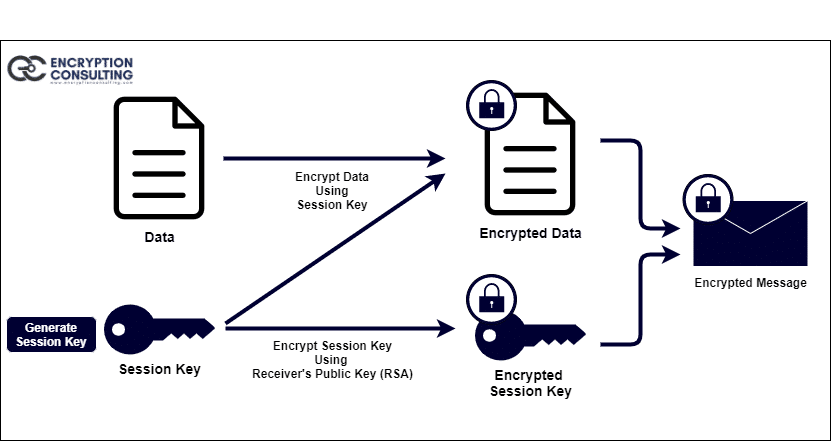
PGP is a hybrid cryptographic system. It combines the best features of both symmetric and public-key cryptography in one workflow. When a user encrypts plaintext with PGP, the process works as follows:
First, the plaintext is compressed. Data compression reduces transmission time and disk space use, and improves cryptographic security by reducing the patterns in plaintext that cryptanalysis techniques exploit. Files with very small sizes may not be compressed.
Second, PGP generates a session key: a one-time symmetric key generated from the randomness of cursor movements and keystrokes. This session key is used to encrypt the plaintext using a fast and secure symmetric encryption algorithm, producing ciphertext. The session key is then encrypted with the recipient’s public key using asymmetric encryption.
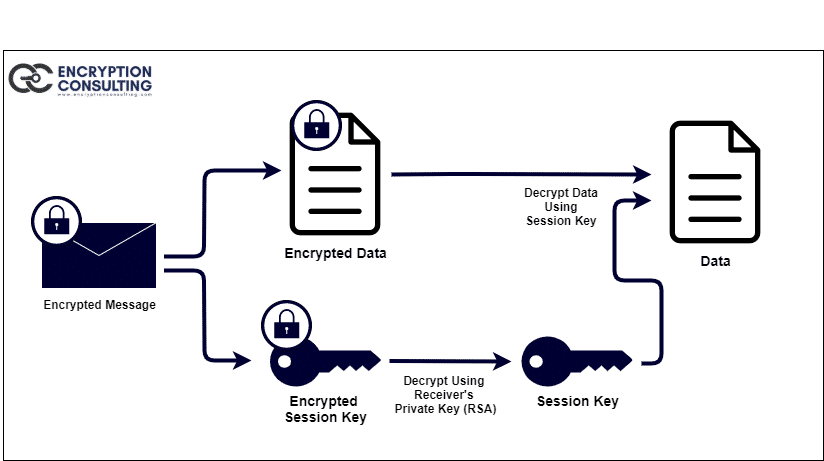
On the recipient side, decryption works in reverse. The recipient’s private key decrypts the encrypted session key; the recovered session key then decrypts the ciphertext to recover the original plaintext. The two-layer encryption model gives the convenience and security of public-key encryption for key distribution with the speed of symmetric encryption for data processing. Public-key encryption is computationally slower than symmetric encryption; PGP uses asymmetric encryption only for the short session key, and symmetric encryption for the data itself, combining speed and security.
Use Cases of PGP Encryption
The three primary uses of PGP encryption are:
- To encrypt data files at rest
- To send and receive encrypted emails
- To verify the sender’s identity through digital signatures
Encrypt Data: PGP can be used to encrypt files at rest. PGP offers a highly secure solution for encrypting data at rest, especially when combined with a Threat Detection and Response solution. The algorithm used by PGP, typically the RSA algorithm for the asymmetric component, is computationally infeasible to break with currently available computing resources. This strong security has made PGP encryption the basis for various data protection applications.
Encrypt Emails: PGP is most widely known as the standard for encrypting email content. Activists, journalists, legal professionals, and others who handle sensitive data use PGP to ensure email content remains confidential even if the email server or transmission is compromised. As awareness of data collection by technology platforms has grown, PGP email encryption has expanded to general personal and professional use for anyone with privacy requirements.
Identity Verification: PGP can be used for identity verification through digital signatures. If a recipient is uncertain about the identity of the sender, they can request a message signed with the sender’s PGP private key. The recipient uses the sender’s public key to verify the signature. A successful verification confirms that the message was sent by the holder of that private key and has not been modified since signing. Digital signatures provide authentication, integrity, and non-repudiation for digital communications.
Pros of PGP Encryption
- It is extremely secure: RSA asymmetric encryption combined with AES or similar symmetric encryption provides strong confidentiality that is computationally infeasible to break with current resources
- It improves cloud security by enabling encryption of data at rest that remains secure even if the cloud provider’s storage is compromised
- It is relatively easy to learn and use with tools like GnuPG that guide users through the key generation and encryption process interactively
Cons and Limitations of PGP Encryption
- There is no password or private key recovery process: if the passphrase protecting the private key is forgotten or the private key is lost without a backup, any data encrypted with the corresponding public key is permanently inaccessible
- Both the sender and receiver must have compatible PGP software: if the recipient does not have a PGP implementation installed, they cannot decrypt PGP-encrypted messages, limiting adoption in communication with parties who are not PGP users
- Key management requires discipline: PGP keys must be distributed, verified, rotated, and revoked through an ongoing management process; without organizational discipline, key management breaks down over time
How to Create a PGP Key Pair Using GnuPG
Prerequisite: This guide demonstrates PGP key pair generation using GnuPG (GNU Privacy Guard), the open-source OpenPGP implementation. Download GnuPG (Gpg4win for Windows) from: https://gpg4win.org/get-gpg4win.html. On Linux, install via your package manager (apt install gnupg or yum install gnupg). On Mac, install via Homebrew (brew install gnupg).
Follow the steps below to generate a PGP key pair:
- Open the Command Prompt (cmd) as Administrator on Windows, or a terminal window on Linux or Mac.
-
Execute the command below to start the key generation process:
$ gpg --full-generate-key

-
The command prompts for configuration. Follow each step in order:
-
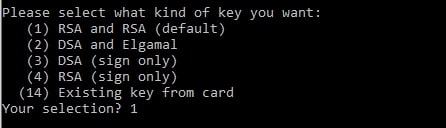
Select key type: choose RSA and RSA (the default). This generates an RSA key pair for both encryption and signing.
-
Select key size: the prompt accepts a value between 1024 and 4096. The default is 3072. Hit enter to accept 3072, or type 4096 for maximum security margin.

-
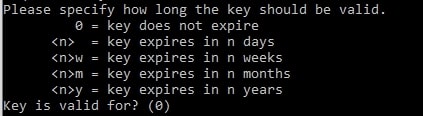
Select key validity: the prompt accepts a number of days, weeks, months, or years. 0 (the default) means the key does not expire. Hit enter to accept 0, or enter a validity period appropriate for your security policy.
-
Confirm that the key does not expire (if 0 was selected). Type Y to confirm.

-
Enter your identity information: Real Name, Email Address, and optionally a Comment. The Real Name can be a person’s name, a product name, or a company name. Leave the Comment blank unless you need to distinguish this key from others with the same name and email.

-
Review and confirm the key details. The prompt displays the name, email, and comment you entered.
Type O for Okay.
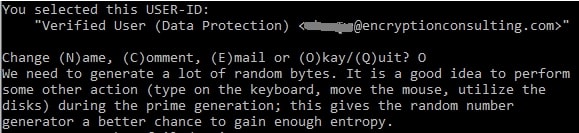
- A passphrase prompt opens. Enter a strong passphrase and confirm it. This passphrase protects the private key; do not lose it. There is no recovery mechanism if the passphrase is forgotten.
-
Copy the Public Key ID from the output. The key ID is displayed in the generation output and is needed for the export commands in the next step.

-
-
Export the Public and Private Keys immediately after generation. Store both exports in a secure location.
-
To export the Public Key (safe to share with others):
$ gpg --export -a keyid > publickeyname.key

-
To export the Private Key (keep secure; never share):
$ gpg --export-secret-key -a keyid > privatekeyname.key
-
The export command for the private key prompts for the passphrase you entered in Step 3. Enter the passphrase and hit enter to complete the export.
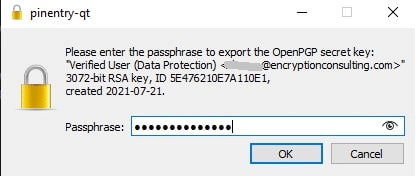
Note: Both the public key file and the private key file will be saved in the directory where the export commands were executed. Store the private key file in a secure, backed-up location protected with strong access controls. Distribute the public key file to any party who needs to send you encrypted messages or verify your digital signatures.
Validating the Generated Key Pair
After generation and export, run the following validation steps to confirm the key pair was created successfully:
- List all keys in the keyring to confirm the new key appears: gpg –list-keys (for public keys) and gpg –list-secret-keys (for private keys)
- Verify the key ID and fingerprint match the output shown during generation
- Test encryption and decryption with the new key pair before deploying it: encrypt a test file to yourself using the public key and decrypt it using the private key and passphrase
- Confirm both export files exist in the expected directory and are non-zero size before closing the terminal session
Update Log
| Date | Update |
|---|---|
| July 2021 | Original blog post published covering PGP encryption, use cases, pros, cons, and GnuPG key generation steps with screenshots |
| October 2025 | Screenshots updated to new hosted URLs; PGP Encrypt and Decrypt diagrams updated |
| September 2026 (this update) | Content updated with structured answer-first opening, Quick Answer H2, expanded explanations of how PGP works, limitations section, validation steps, descriptive image alt text, update log, and FAQ section |
Frequently Asked Questions
What is PGP and what is it used for?
Pretty Good Privacy (PGP) is a hybrid cryptographic system combining symmetric and asymmetric encryption to provide confidentiality, authentication, and integrity for digital communications. Its three primary uses are: encrypting files at rest; encrypting email content so only the intended recipient can read it; and creating digital signatures that verify the sender’s identity and confirm message integrity.
How does PGP encryption work?
PGP compresses the plaintext, generates a one-time session key, encrypts the plaintext with the session key using fast symmetric encryption, then encrypts the session key with the recipient’s public key. The recipient uses their private key to decrypt the session key, then uses the session key to decrypt the ciphertext. This hybrid model provides the key distribution benefits of asymmetric encryption with the processing speed of symmetric encryption.
What is the best tool for generating a PGP key pair?
GnuPG (GNU Privacy Guard) is the best tool: a free, open-source, actively maintained OpenPGP implementation available on all major operating systems. On Windows, download Gpg4win from https://gpg4win.org/get-gpg4win.html. The key generation command is gpg –full-generate-key, which guides the user through an interactive configuration for key type, size, validity, and identity.
What are the limitations of PGP encryption?
The primary limitations are: no password or private key recovery if the passphrase is forgotten; compatibility requirement between sender and recipient PGP software; and key management overhead requiring ongoing discipline for key distribution, rotation, and revocation.
What RSA key size should I choose when generating a PGP key pair?
The default is 3072-bit RSA, which provides adequate security for most current purposes. 4096-bit RSA provides a larger security margin and is appropriate for long-lived keys or high-security applications. Do not select 1024-bit or 2048-bit RSA for new keys; these are considered insufficient by current cryptographic standards.